


Problem Solver I
August 6, 2024
Solved

Troubleshooting: Can't Move Cursor in Text Boxes

  • August 6, 2024
  • 5 replies
  • 232 views

Hi Klaviyo Community,

I’m having a recent issue with text boxes while composing emails - my ability to mouse into text boxes to edit texts is very limited and is forcing me to use keyboard workarounds.
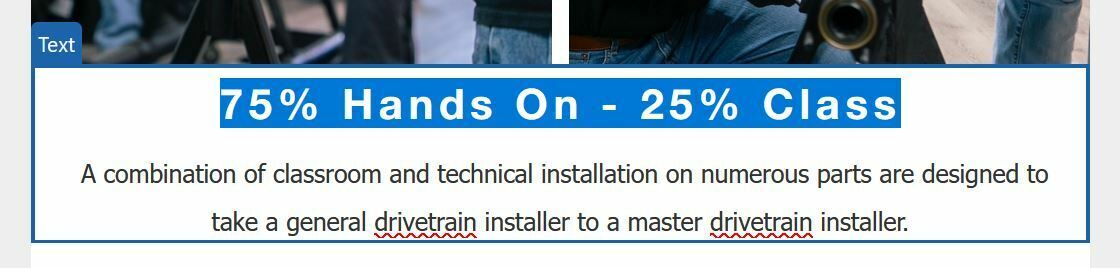
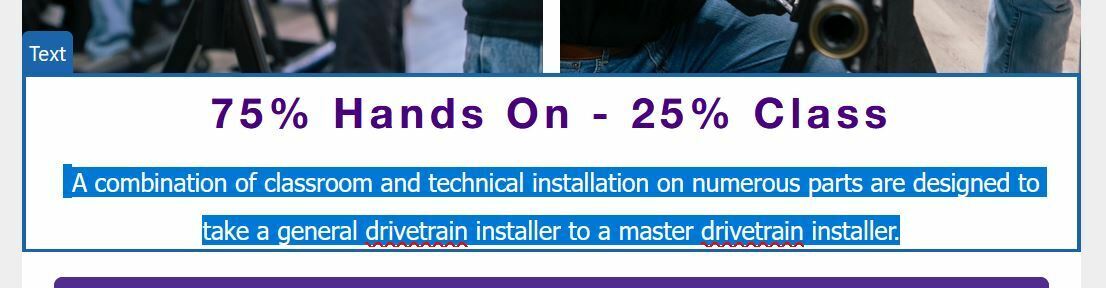
Double clicking into the text box will select a block of text, or all text, but won’t let me position the cursor to specific location, or deselect without highlighting another paragraph.
I can only select blocks of text with the mouse.

If I click into a text box, I can right arrow on the keyboard to get a normal cursor; but have to do the rest of my selections and edits with my keyboard only. This is majorly affecting my workflow.
This only affects text boxes that are in-line; text boxes set in tables in the left column work normally.

Is this an issue specific to my computer? This occurs in both Chrome and Firefox on PC, Windows 10. Any advice or confirmation that this is an issue for others is appreciated!

Thanks!


    This topic has been closed for replies.
    Best answer by CC_RWW

    Update 2: This issue occurs in both Chrome and Firefox; but not Microsoft Edge. Not my usual browser; but at least I can work around it for the time being!

    5 replies

    CC_RWWAuthor
    Problem Solver I
    August 6, 2024

    Tried to test this on my coworker’s computer; and it works fine. Could this be related to the fact that I have my left and right mouse buttons switched in Windows settings due to being a lefty?


    CC_RWWAuthorAnswer
    Problem Solver I
    August 6, 2024

    Update 2: This issue occurs in both Chrome and Firefox; but not Microsoft Edge. Not my usual browser; but at least I can work around it for the time being!

    ArpitBanjara
    Principal User II
    Principal User II
    August 7, 2024

    Hey @CC_RWW 

    I can see my cursor and I am using Google chrome. It sounds like your issue is device specific.

    I tried to take a screenshot to show you, but the cursor is not visible in the screenshot.

    I hope this helps

    Cheers

    Arpit

    Arpit Banjara - Lead Email Marketing Specialist at Flowium
    CC_RWWAuthor
    Problem Solver I
    August 7, 2024

    It works correctly everywhere but in Klaviyo text editing. Hoping an update to the platform, drivers, or somewhere else along the way magically fixes it; but it’s good to document these things! I’ll continue working in Edge for the time being. Thanks!

    CC_RWWAuthor
    Problem Solver I
    August 16, 2024

    Update 2: Things are again working normally for me in my preferred browser, Firefox.