


Contributor I
May 2, 2023
Solved

Unable to use metric detail in customer flow

  • May 2, 2023
  • 3 replies
  • 132 views

Hi!

I have a question regarding the use of a metric in a customer flow. I have a metric that passes along some details. It all comes through nicely when I look at the metric feed:
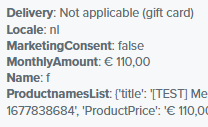
Now, in my customer flow, I would like to add a trigger split using the dimension “ProductnamesList”, which is basically a long list of products that a customer has bought, seperated by commas. But for some reason, it doesn't show up in the list of dimensions when I look at the trigger setup.
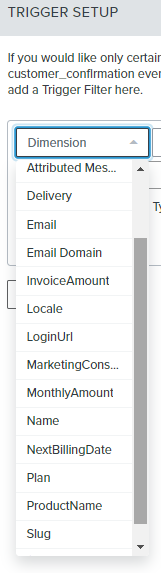
 

I've set-up brand new metrics to make sure it wasn't a bug caused by historic changes to the metric, but it all gives the same result: the dimension comes through in the metric, but I can't use it in the flows as trigger filter / split.

Did anyone experience something similar already? Is it maybe because the dimension is a comma-seperated list? 

Thanks you very much in advance for your time! 

    This topic has been closed for replies.
    Best answer by stephen.trumble

    Hey @Bram 

    Sorry for the delay, I am reaching out to our support team to see if they can help Identify what the barrier is to finding the dimension you are trying to use. Once I have the answer I will let you know what they have found!

    3 replies

    stephen.trumble
    Klaviyo Alum
    May 3, 2023

    Hey @Bram 

    Welcome to the community and congrats on your first post! Happy to help get your custom metric triggered flow working. 

    The most likely reason you aren't seeing the correct dimension is because the data is being passed within a different custom metric. I would suggest verifying which custom metric is passing “ProductnameList” and set that as the flow trigger and then you will be able to use the correct trigger filter. 

    Hope this helps!

    -Stephen
    BramAuthor
    Contributor I
    May 4, 2023

    Hi @stephen.trumble,

    Thanks for the warm welcome and your reply!

    It's a good suggestion, but I am 100% using the right custom metric in my trigger (the reason why the list in the “filter screenshot” doesn't match the “metric screenshot”, is because I tested a bit with different dimensions in the trigger, and Klaviyo seems to remember all of them, even if I remove them from the custom metric).

    So, unfortunately, my problem is still there: I can't filter my trigger on that dimension :(


    stephen.trumble
    Klaviyo Alum
    May 11, 2023

    Hey @Bram 

    Sorry for the delay, I am reaching out to our support team to see if they can help Identify what the barrier is to finding the dimension you are trying to use. Once I have the answer I will let you know what they have found!

    -Stephen
