

July 22, 2021
Solved

Where to add a snippet for a popup on my Shopify site

HI , I need an easy reply to my issue as i’m not very computer savvy . I tried to add a snippet for a Kaviyo pop up into theme.liquid in my shopify account where the video suggested to add it but it didnt work - just above </body >  and </html. which was on line 143 but i have a few more additions of lines for Afterpay which goes all the way to maybe line 182 . should i be scrolling all the way past the Afterpay stuff and add it in the bottom ??? Thank you

This topic has been closed for replies.
retention
retentionAnswer
2025 Champion
July 22, 2021

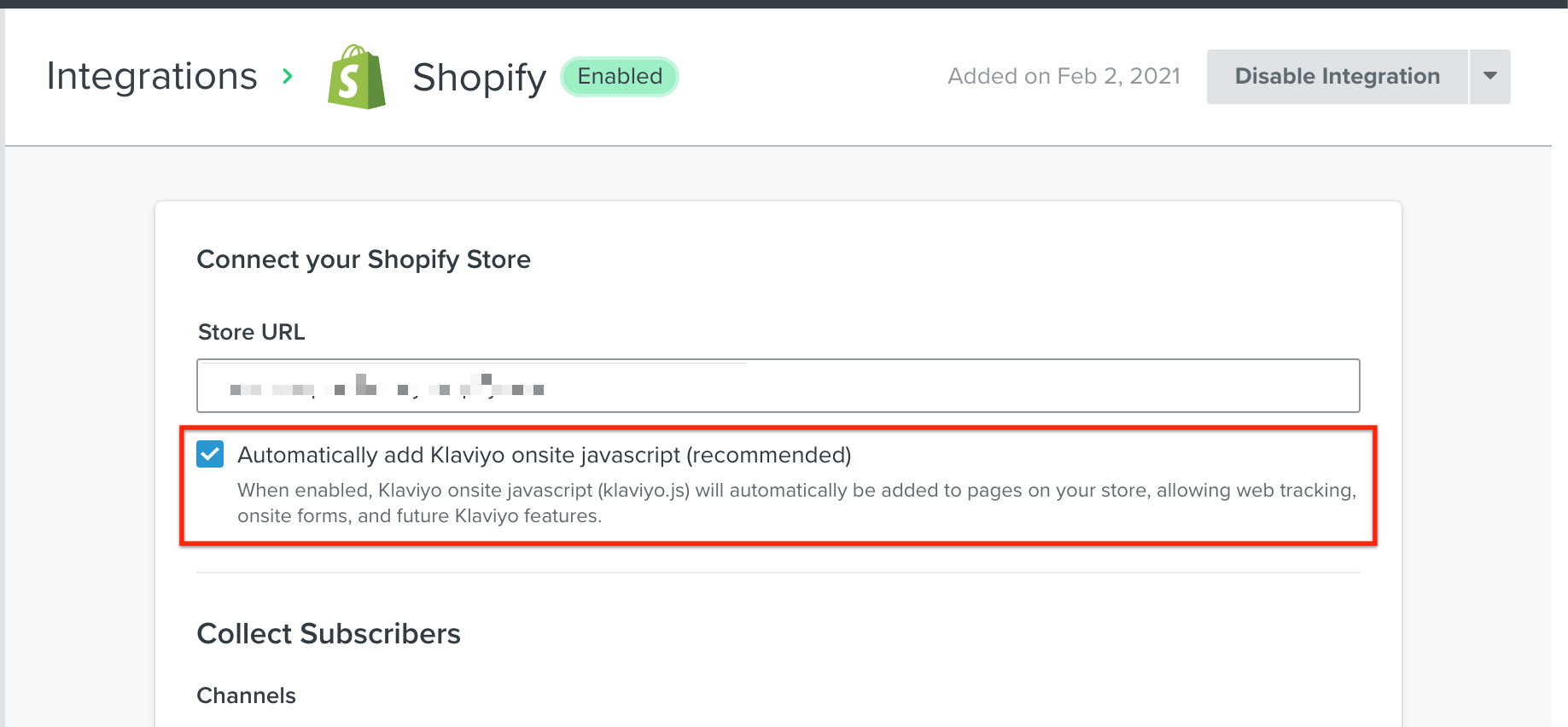
@My favourite cousin - Hello, and welcome to the community.  If you are using the Klaviyo Shopify Integration, then this is typically done for you if you have this checkbox selected in your integration options:

Enabling Javascript in Klaviyo Shopify Integration

Here’s more documentation to help you set this up:

Joseph Hsieh // retentioncommerce.com // X: @retention

1 reply

retention
Partner - Platinum
retentionAnswer
2025 Champion
July 22, 2021

@My favourite cousin - Hello, and welcome to the community.  If you are using the Klaviyo Shopify Integration, then this is typically done for you if you have this checkbox selected in your integration options:

Enabling Javascript in Klaviyo Shopify Integration

Here’s more documentation to help you set this up:

Joseph Hsieh // retentioncommerce.com // X: @retention