

Contributor III
September 23, 2022
Solved

Why can't I crop images?

  • September 23, 2022
  • 5 replies
  • 841 views

I can't really show screenshot right now but I will explain to my best ability.


I am uploading some email templates on Klaviyo (mostly image-based) which means I have to be cropping and cropping so I can link sections that have to be linked and it has been going smoothly as I have already uploaded about 17 emails already.


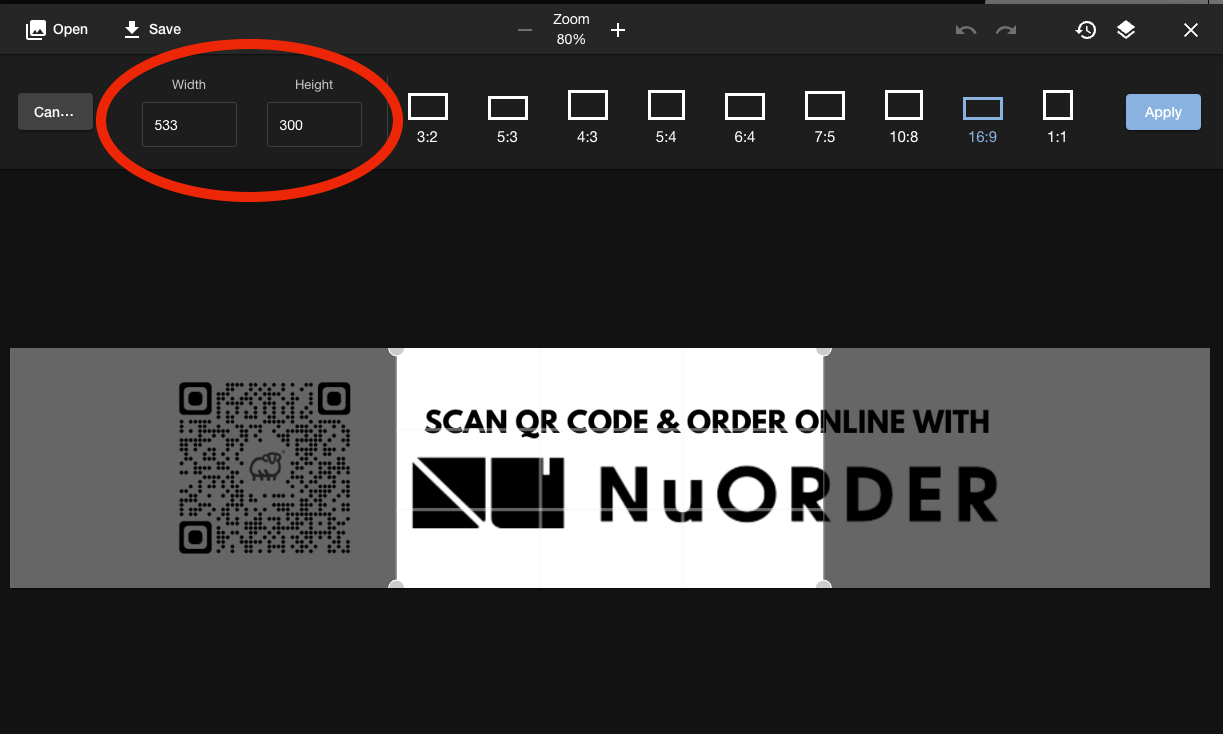
Now suddenly, when I click on "crop" in the image editor on Klaviyo, it doesn't bring the height and width number adjuster (this is what allows me to select the height of my new cropping)


It just gives me certain frames to choose from like 1:1, 16:9, 10:8


I can't adjust the way I want. What kind of bug is this?


This has happened before but I just found my way to edit outside of Klaviyo but I can't do that now. Can you fix this?


    This topic has been closed for replies.
    Best answer by Akers Digital

    Hey @Favewriter ,

    Two ways:

    1. Klaviyo Editor
      There should still be a crop tool where you can set your own crop. I attached a screenshot. You can set the height/width in pixel by tying in the values or by clicking the image itself and drag/drop the highlighted area over the image.
    2. Work outside of Klaviyo
      I’m a personal fan of uploading the exact specs of the image needed and try to limit use of padding and adjusting the size. This helps reduce formatting errors on email platforms like Outlook. A really great free tool for this is Canva.com. Plus you can ensure you’re uploading a web optimized image.


    5 replies

    Akers Digital
    Partner - Silver
    Partner - Silver
    September 23, 2022

    Hey @Favewriter ,

    Two ways:

    1. Klaviyo Editor
      There should still be a crop tool where you can set your own crop. I attached a screenshot. You can set the height/width in pixel by tying in the values or by clicking the image itself and drag/drop the highlighted area over the image.
    2. Work outside of Klaviyo
      I’m a personal fan of uploading the exact specs of the image needed and try to limit use of padding and adjusting the size. This helps reduce formatting errors on email platforms like Outlook. A really great free tool for this is Canva.com. Plus you can ensure you’re uploading a web optimized image.


    Contributor III
    September 23, 2022

    Thanks a lot. 


    I have been cropping images the way shown in your screenshot but the problem I am facing now is that the part you circle suddenly gets hidden and I can't crop the way I want. 


    I logged out and logged in back, tried login into Klaviyo even on mobile and another laptop. Still same thing. Check this screenshot 


    Contributor I
    November 24, 2023

    We have the same issue with a very bad crop functionality. Users should not have to go to Canva or other platforms for crop and image sizing. Klaviyo with its $billion valuation should be able to figure this out. Basic stuff for a company with your resources. 

    Taylor Tarpley
    Community Manager
    Community Manager
    November 24, 2023

    Hi there @Mitch


    Thanks for sharing your feedback with us! 


    We made the difficult decision to deprecate this feature three months ago and optimize others that a larger majority of our user base utilize more frequently. I can understand the frustration surrounding this and deeply apologize for the inconvenience. I will share this feedback with the template team!


    Thanks for participating in the Community!

    -Taylor 

    Contributor II
    January 2, 2024

    Boo.