Contributor I
April 6, 2022
Solved

WooCommerce: Error Your Authentication credentials have expired or are invalid

  • April 6, 2022
  • 11 replies
  • 1220 views

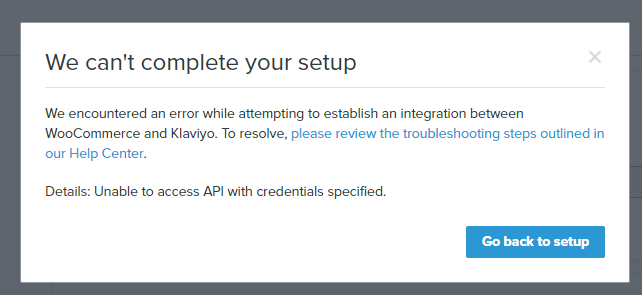
After trying to connect Klaviyo to Woocommerce, I’m getting this error. Please see my video recorded during the integration:


https://www.awesomescreenshot.com/video/8255528?key=f1f3d703d3c01112fe87f7d507e5bbbd


Update error: Your Authentication credentials have expired or are invalid. Please restart the integration process.

Details: Unable to access API with credentials specified.


    This topic has been closed for replies.
    Best answer by chloe.strange

    ​​​​​​Hi @pmaly

    Thanks for joining our Community and I’m sorry you’re experiencing this issue. @David To gave some helpful steps to follow on this thread:

    Please try the following:

    1. Completely remove (not Disable) the Shopify integration in Klaviyo: https://www.klaviyo.com/integration/woocommerce
    2. Log out of your Klaviyo account
    3. Fully clear the browser cache and close out of the browser
    4. Log back into your Klaviyo account via an incognito window
    5. Re-add WooCommerce from the All Integrations tab: https://www.klaviyo.com/integrations

    Let us know if other questions come up. Have a great day! 

    ~Chloe

    11 replies

    chloe.strange
    Community Manager
    Community Manager
    April 6, 2022

    ​​​​​​Hi @pmaly

    Thanks for joining our Community and I’m sorry you’re experiencing this issue. @David To gave some helpful steps to follow on this thread:

    Please try the following:

    1. Completely remove (not Disable) the Shopify integration in Klaviyo: https://www.klaviyo.com/integration/woocommerce
    2. Log out of your Klaviyo account
    3. Fully clear the browser cache and close out of the browser
    4. Log back into your Klaviyo account via an incognito window
    5. Re-add WooCommerce from the All Integrations tab: https://www.klaviyo.com/integrations

    Let us know if other questions come up. Have a great day! 

    ~Chloe

    Contributor I
    April 12, 2022

    Hey same problem here ! I tried the solution above but it does nothing...

    pmalyAuthor
    Contributor I
    April 13, 2022

    Sorry for the delay in my response. I went through the process that is described in chloe.strange reply, but it didn’t resolved the issue for me.


    Any other ideas?

    pmalyAuthor
    Contributor I
    April 13, 2022

    FYI, I’ve tried to do the process with a totally new browser that I’ve never installed on my PC (Firefox).

    Still getting the same result...

    Contributor I
    July 27, 2022

    ​​​​​​Hi @pmaly

    Thanks for joining our Community and I’m sorry you’re experiencing this issue. @David To gave some helpful steps to follow on this thread:

    Please try the following:

    1. Completely remove (not Disable) the Shopify integration in Klaviyo: https://www.klaviyo.com/integration/woocommerce
    2. Log out of your Klaviyo account
    3. Fully clear the browser cache and close out of the browser
    4. Log back into your Klaviyo account via an incognito window
    5. Re-add WooCommerce from the All Integrations tab: https://www.klaviyo.com/integrations

    Let us know if other questions come up. Have a great day! 

    ~Chloe

    Mam i have followed all the things but it’s not working can you please explain briefly so that i can integrate klaviyo in website

    Contributor I
    December 4, 2022

    Hi,


    I have the same problem and tried the steps up above and tried it on a different computer as well with no success. Any help on solving this would be great.

    Contributor I
    December 10, 2022

    I have the same issue as well. The steps above do not resolve the issue.

    David To
    Klaviyo Employee
    Klaviyo Employee
    December 15, 2022

    Hey @Tartan Flame and @abaxen,

    If you’re still having trouble fully authenticating and getting your WooCommerce integration connected to Klaviyo, I would recommend double checking your permissions in your WooCommerce backend as well. 

    If you’ve checked and made sure you have the right permissions, I would encourage you to reach out to our wonderful Support team. They’ll be able to take a closer look into your account to see if there were any additional errors or clues preventing the connection from being established.

    David


    Contributor I
    November 6, 2023

    I have the same issue, I’m not sure if the problem is that my ID looks like this ID: companyId instead of my Klaviyo’s API KEY, and every time I try to integrate, WooCommerce creates a new API KEY (write/read).
    That could be the root cause of the issue? (not sharing with WooCommerce the Klaviyo’s API KEY)

    Brian Turcotte
    Klaviyo Alum
    January 7, 2024

    Hi @WaveZero!

    Is this still occurring for you? 


    Best,

    Brian