


Question

Klaviyo causing VERY POOR loading times on my store

  • April 20, 2026
  • 5 replies
  • 86 views

Forum|alt.badge.img

I have recently implemented klaviyo in my shopify theme and have noticed that it has had a very negative impact on my stores performance. I would like to know why the Klaviyo app would do this and if it will be addressed? There is little to no support available so I have to make a post here…

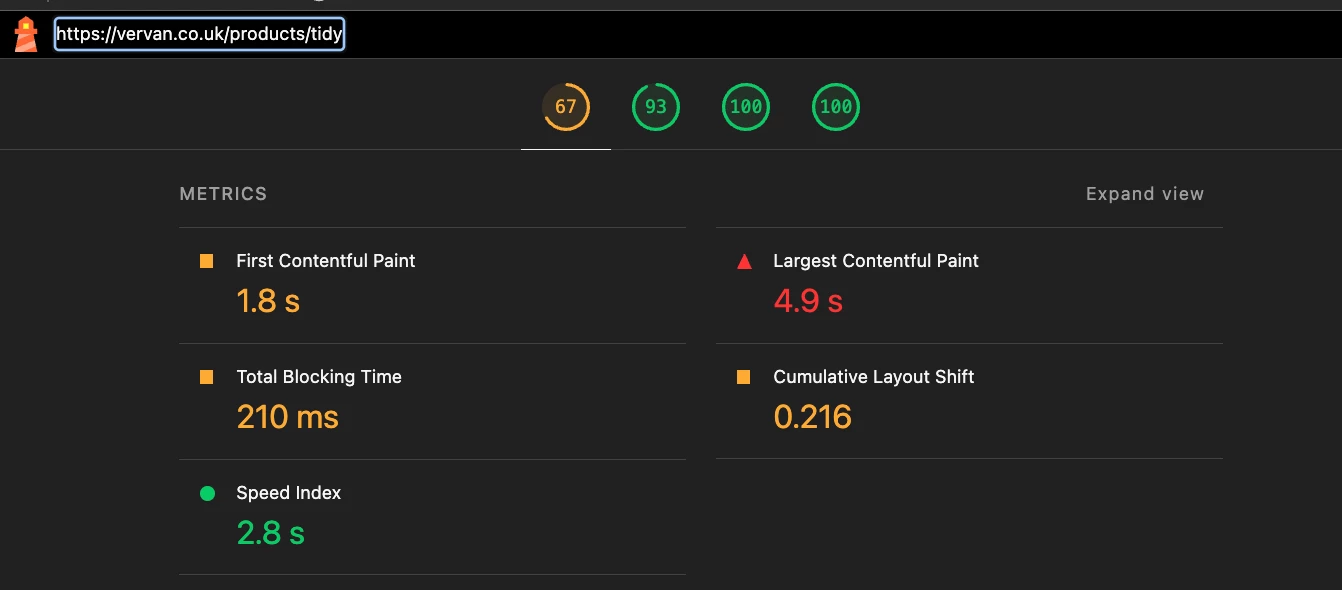
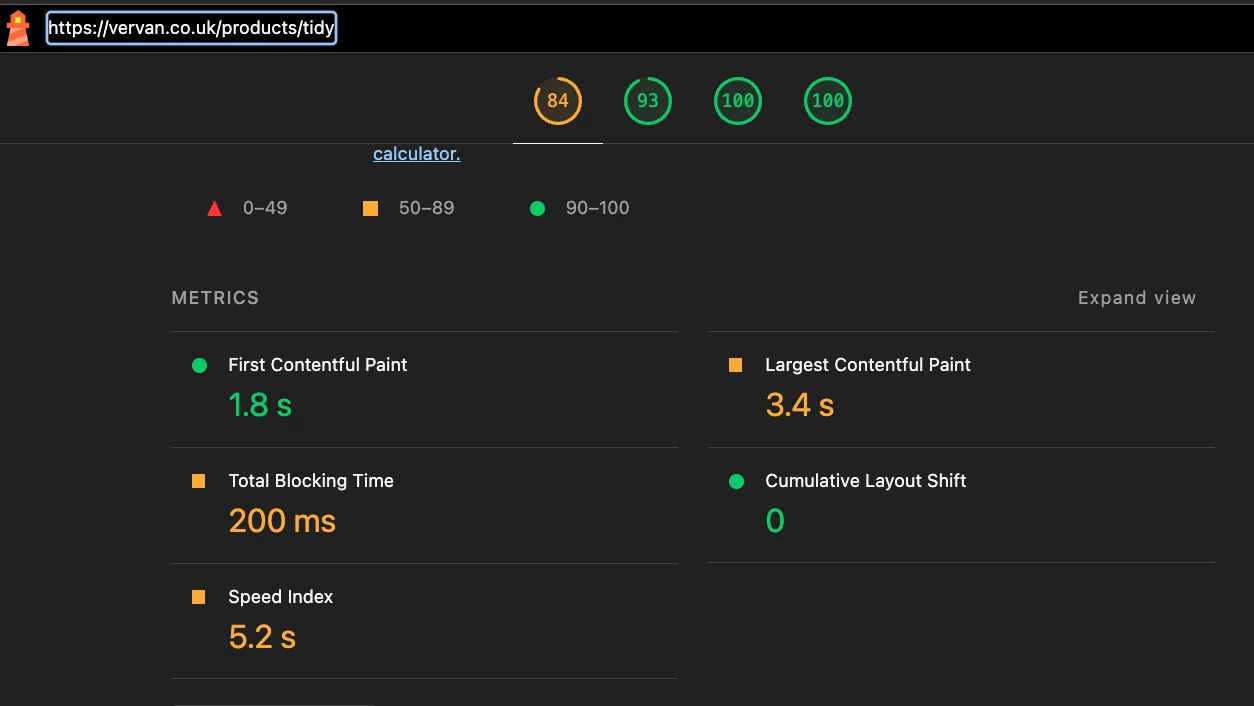
Please see below, my store with and without the Klaviyo JS embed enabled. Note that I have two Klaviyo widgets enabled...

With Klaviyo embed enabled
Without Klaviyo embed enabled
 

5 replies

Byrne C
Community Manager
Forum|alt.badge.img+29
  • Community Manager
  • April 21, 2026

Hi ​@Luke25100,

You mention that you have two widgets enabled - what two widgets are these? If you have the Klaviyo onsite javascript installed on your site multiple times, that might be the issue here. I recommend viewing the page source on the homepage of your ecommerce store, and checking to see how many times your 6-character public API key appears (If you don’t know your public API key, you can find it in Settings > API Keys in Klaviyo). If our onsite Javascript appears multiple times, you’ll want to remove one of them from your site. Klaviyo Javascript looks like the code sent below, with PUBLIC_API_KEY replaced with your public API key:

<script type="text/javascript" async=""
src="https://static.klaviyo.com/onsite/js/PUBLIC_API_KEY/klaviyo.js"></script>;

Additionally, some stores report improvements to page speeds when they add our onsite tracking via Google Tag Manager. Our help article here explains how to do this.


Forum|alt.badge.img
  • Author
  • Contributor I
  • April 21, 2026

Hi ​@Luke25100,

You mention that you have two widgets enabled - what two widgets are these? If you have the Klaviyo onsite javascript installed on your site multiple times, that might be the issue here. I recommend viewing the page source on the homepage of your ecommerce store, and checking to see how many times your 6-character public API key appears (If you don’t know your public API key, you can find it in Settings > API Keys in Klaviyo). If our onsite Javascript appears multiple times, you’ll want to remove one of them from your site. Klaviyo Javascript looks like the code sent below, with PUBLIC_API_KEY replaced with your public API key:

<script type="text/javascript" async=""
src="https://static.klaviyo.com/onsite/js/PUBLIC_API_KEY/klaviyo.js"></script>;

Additionally, some stores report improvements to page speeds when they add our onsite tracking via Google Tag Manager. Our help article here explains how to do this.

I have the review list enabled and the review stars enabled on my store. I have them configured on my theme’s code. Klaviyo’s JavaScript embed is enabled once on the theme via the Shopify theme editor. The issue seems to be that the JS takes a long time to load and does not lazy load which causes above the fold elements to be negatively impacted.


Byrne C
Community Manager
Forum|alt.badge.img+29
  • Community Manager
  • April 22, 2026

Thanks for clarifying that. In that case, I’d recommend trying to inject our scripts onto your site using Google Tag manager to see if that mitigates this issue. Let me know if you have questions about how to set this up.


Forum|alt.badge.img
  • Author
  • Contributor I
  • April 22, 2026

Thanks for clarifying that. In that case, I’d recommend trying to inject our scripts onto your site using Google Tag manager to see if that mitigates this issue. Let me know if you have questions about how to set this up.

I think this could be a valid solution, is there any guides on how to configure it on GTM?


Byrne C
Community Manager
Forum|alt.badge.img+29
  • Community Manager
  • April 22, 2026