Hey @jensonline
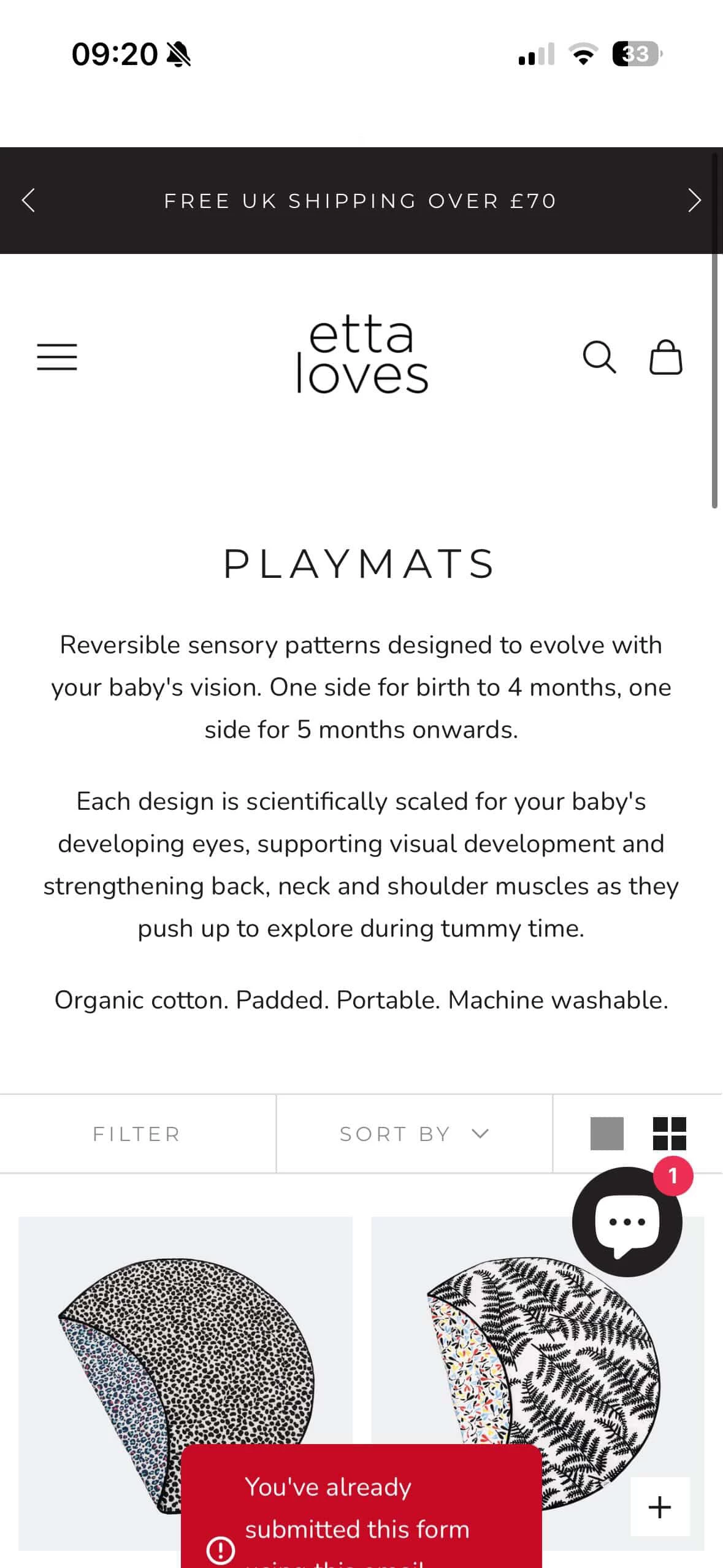
The red box is your Klaviyo footer embed form firing on every page load and immediately telling visitors they've already submitted, because most of them probably have. The theme upgrade is what broke it.
The most likely cause: your new theme has the Klaviyo app embed turned on, but your old footer code (the <div class="klaviyo-form-XXXXXX"> snippet) is still sitting somewhere in a carried-over section. So the form is loading twice, or loading in a weird state that causes it to auto-fire and return that error before anyone even touches it. Start by going into your Shopify theme code editor and searching all files for klaviyo-form. Your form ID is the string of characters that follows that prefix. you can also find it inside Klaviyo in your form's targeting settings. If that ID shows up in more than one place in your theme files, that is your problem right there. Delete the duplicate.
Also worth checking: view your live page source and search for ‘company_id’. If it appears twice, you have a duplicate Klaviyo script on top of everything else, which will need Klaviyo support to clean up on their end.
Once the duplicate is gone, republish the form in Klaviyo and test on a fresh private window. The error should stop appearing.
I hope this helps and thank you for sharing your question here in the community. If you are still stuck, feel free to schedule a call with us here - https://flowium.com/lp/klaviyo-agency/
Cheers.
Arpit