


Contributor I
January 18, 2023
Solved

Abandoned Cart Reminder > Added to Cart

I just setup an abandon cart reminder flow. 

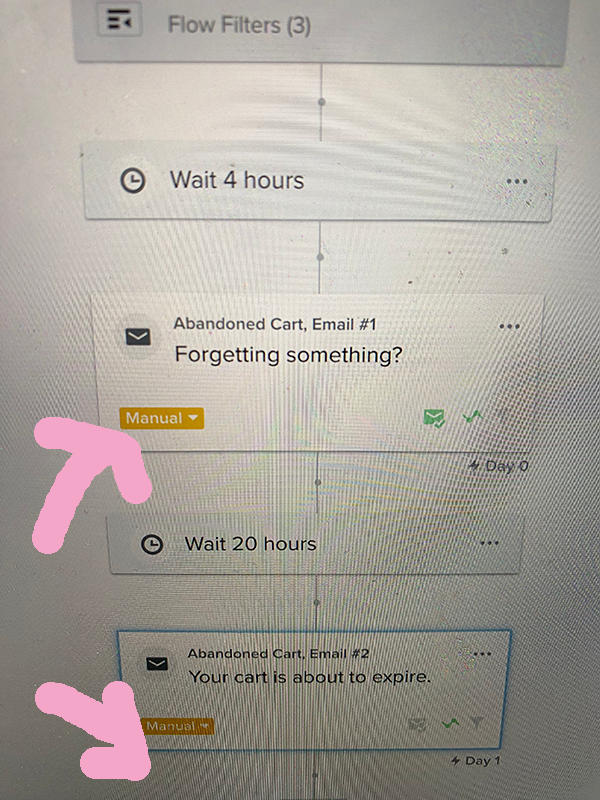
should the button stay on manual, or do I need to switch it to LIVE for the automation to be active? 

I did all the steps for Shopify  including: created the added to cart event
 

also how do i navigate to this url from the navigation? https://www.klaviyo.com/library/flows

or is this a an orphan page and I would need to remember the URL?

This topic has been closed for replies.
Taylor Tarpley
Community Manager
January 18, 2023

Hi @lovewahne, 


Welcome to the Community! Happy to help! 


Happy to hear you’ve set up your Abandoned Cart email with an Add to Cart trigger! If you want to manually approve an email to be sent out every time to each customer, then keep the email status as manual, but if you want them to go out automatically, set it to live!  


Do you mind explaining the second part of your question more? In your account, when you  navigate to the Flows section of your account, this is the URL of where all your flows will live in your account.


Finally, I’d check out these additional resources to grow your confidence and skillset with Klaviyo! 


Thanks for participating in the Community!

-Taylor 

3 replies

Taylor Tarpley
Community Manager
Community Manager
January 18, 2023

Hi @lovewahne, 


Welcome to the Community! Happy to help! 


Happy to hear you’ve set up your Abandoned Cart email with an Add to Cart trigger! If you want to manually approve an email to be sent out every time to each customer, then keep the email status as manual, but if you want them to go out automatically, set it to live!  


Do you mind explaining the second part of your question more? In your account, when you  navigate to the Flows section of your account, this is the URL of where all your flows will live in your account.


Finally, I’d check out these additional resources to grow your confidence and skillset with Klaviyo! 


Thanks for participating in the Community!

-Taylor 

lovewahneAuthor
Contributor I
January 18, 2023

How do I access the URL https://www.klaviyo.com/library/flows? 

When I click on FLOW from the left navigation I don’t see the flow library (https://www.klaviyo.com/library/flows) i see my list of flows:See the video attached

https://youtu.be/HQKqnpcgPW0


David To
Klaviyo Employee
Klaviyo Employee
January 18, 2023

Hey @lovewahne,

The flows library - which hosts a number of pre-made flows based on your particular marketing goals, ecommerce integration, and messaging channel (SMS, email, or both) can be accessed by navigating directly to https://www.klaviyo.com/library/flows. 

Alternatively, you can access it by navigating into the Flows tab and clicking on Create Flow. This first page you’re greeted with will be the flows library where you can create essential flows Klaviyo recommends, browse by the goal of your flow, or view all the pre-built flows that align with your integration types.

David