Contributor I
March 22, 2024
Solved

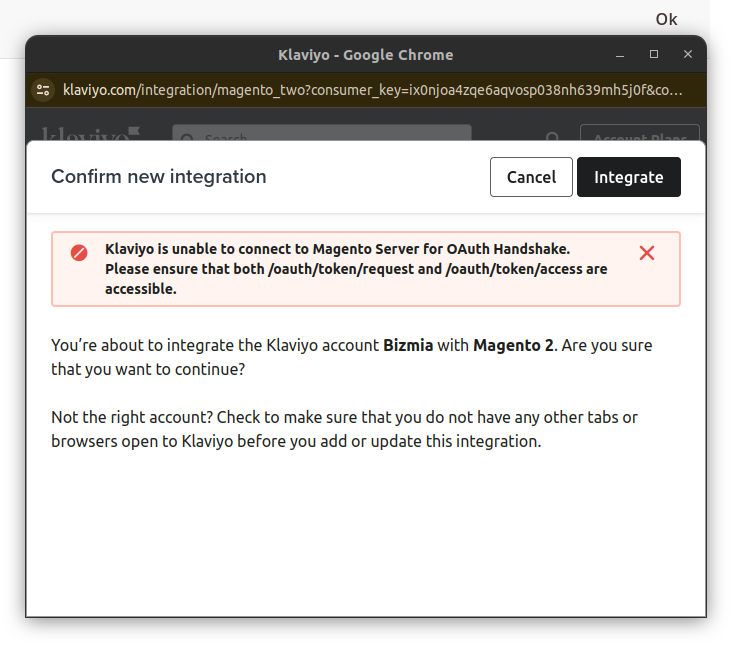
getting this error while following the documentation on configuring klaviyo with magento2

  • March 22, 2024
  • 4 replies
  • 492 views

Klaviyo is unable to connect to Magento Server for OAuth Handshake. Please ensure that both /oauth/token/request and /oauth/token/access are accessible.

 

    This topic has been closed for replies.
    Best answer by Sujal

    Using Postman:

    1. Open Postman: Launch the Postman application on your computer.
    2. Create a GET Request: Click the "GET" button to initiate a GET request.
    3. Enter the URL: In the URL bar, paste the first endpoint URL: https://[your-magento-store.com]/oauth/token/request (replace "[your-magento-store.com]" with your actual Magento store URL).
    4. Send the Request: Click the "Send" button.

    Expected Response:

    • If the endpoint is accessible, Postman should display a response code in the 200 range (e.g., 200 OK). This indicates a successful connection.
    • The response body might contain additional information depending on your Magento configuration.

    Repeat for Second URL:

    1. Repeat steps 2-4, replacing the URL with the second endpoint: https://[your-magento-store.com]/oauth/token/access.

    4 replies

    Sujal
    Expert Problem Solver II
    Expert Problem Solver II
    March 23, 2024

    Klaviyo can't connect to your Magento 2 store (OAuth handshake error). Here's how you can fix it:

    • Check accessibility: Make sure these Magento 2 URLs are reachable: /oauth/token/request & /oauth/token/access. Use tools like Postman or curl to test.
    • Review Klaviyo docs: Double-check the Klaviyo documentation you used for specific troubleshooting steps.
    • Enable Bearer Tokens (Magento 2.4.6+): In Magento admin, go to Stores > Configuration > Services > OAuth > Consumer Settings. Set "Allow OAuth Access Tokens..." to Yes. Save changes.
    • Look for firewall/security restrictions: Ensure nothing on your server is blocking Klaviyo's access to those URLs.

    Let me know how it goes, looking forward to your reply!

    Sujal Shrestha | www.theklientx.com
    Contributor I
    March 25, 2024

    How can i test this?

    • Check accessibility: Make sure these Magento 2 URLs are reachable: /oauth/token/request & /oauth/token/access. Use tools like Postman or curl to test.
    Sujal
    Expert Problem Solver II
    SujalAnswer
    Expert Problem Solver II
    March 25, 2024

    Using Postman:

    1. Open Postman: Launch the Postman application on your computer.
    2. Create a GET Request: Click the "GET" button to initiate a GET request.
    3. Enter the URL: In the URL bar, paste the first endpoint URL: https://[your-magento-store.com]/oauth/token/request (replace "[your-magento-store.com]" with your actual Magento store URL).
    4. Send the Request: Click the "Send" button.

    Expected Response:

    • If the endpoint is accessible, Postman should display a response code in the 200 range (e.g., 200 OK). This indicates a successful connection.
    • The response body might contain additional information depending on your Magento configuration.

    Repeat for Second URL:

    1. Repeat steps 2-4, replacing the URL with the second endpoint: https://[your-magento-store.com]/oauth/token/access.
    Sujal Shrestha | www.theklientx.com
    Contributor I
    April 26, 2024

    Getting this error while trying it on postman

    base_url/oauth/token/access

    oauth_problem=%22oauth_consumer_key%22+is+required.+Enter+and+try+again%2C+%22oauth_signature%22+is+required.+Enter+and+try+again%2C+%22oauth_signature_method%22+is+required.+Enter+and+try+again%2C+%22oauth_nonce%22+is+required.+Enter+and+try+again%2C+%22oauth_timestamp%22+is+required.+Enter+and+try+again