Contributor I
March 22, 2024
Solved

getting this error while following the documentation on configuring klaviyo with magento2

Klaviyo is unable to connect to Magento Server for OAuth Handshake. Please ensure that both /oauth/token/request and /oauth/token/access are accessible.
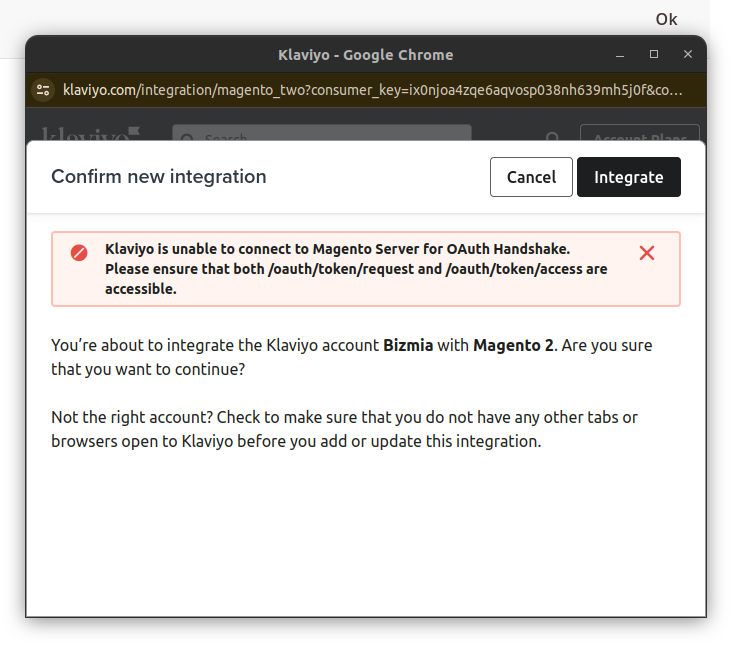

 

    This topic has been closed for replies.
    Sujal
    SujalAnswer
    Expert Problem Solver II
    March 25, 2024

    Using Postman:

    1. Open Postman: Launch the Postman application on your computer.
    2. Create a GET Request: Click the "GET" button to initiate a GET request.
    3. Enter the URL: In the URL bar, paste the first endpoint URL: https://[your-magento-store.com]/oauth/token/request (replace "[your-magento-store.com]" with your actual Magento store URL).
    4. Send the Request: Click the "Send" button.

    Expected Response:

    • If the endpoint is accessible, Postman should display a response code in the 200 range (e.g., 200 OK). This indicates a successful connection.
    • The response body might contain additional information depending on your Magento configuration.

    Repeat for Second URL:

    1. Repeat steps 2-4, replacing the URL with the second endpoint: https://[your-magento-store.com]/oauth/token/access.
    Sujal Shrestha | www.theklientx.com

    4 replies

    Sujal
    Expert Problem Solver II
    Expert Problem Solver II
    March 23, 2024

    Klaviyo can't connect to your Magento 2 store (OAuth handshake error). Here's how you can fix it:

    • Check accessibility: Make sure these Magento 2 URLs are reachable: /oauth/token/request & /oauth/token/access. Use tools like Postman or curl to test.
    • Review Klaviyo docs: Double-check the Klaviyo documentation you used for specific troubleshooting steps.
    • Enable Bearer Tokens (Magento 2.4.6+): In Magento admin, go to Stores > Configuration > Services > OAuth > Consumer Settings. Set "Allow OAuth Access Tokens..." to Yes. Save changes.
    • Look for firewall/security restrictions: Ensure nothing on your server is blocking Klaviyo's access to those URLs.

    Let me know how it goes, looking forward to your reply!

    Sujal Shrestha | www.theklientx.com
    Contributor I
    March 25, 2024

    How can i test this?

    • Check accessibility: Make sure these Magento 2 URLs are reachable: /oauth/token/request & /oauth/token/access. Use tools like Postman or curl to test.
    Sujal
    Expert Problem Solver II
    SujalAnswer
    Expert Problem Solver II
    March 25, 2024

    Using Postman:

    1. Open Postman: Launch the Postman application on your computer.
    2. Create a GET Request: Click the "GET" button to initiate a GET request.
    3. Enter the URL: In the URL bar, paste the first endpoint URL: https://[your-magento-store.com]/oauth/token/request (replace "[your-magento-store.com]" with your actual Magento store URL).
    4. Send the Request: Click the "Send" button.

    Expected Response:

    • If the endpoint is accessible, Postman should display a response code in the 200 range (e.g., 200 OK). This indicates a successful connection.
    • The response body might contain additional information depending on your Magento configuration.

    Repeat for Second URL:

    1. Repeat steps 2-4, replacing the URL with the second endpoint: https://[your-magento-store.com]/oauth/token/access.
    Sujal Shrestha | www.theklientx.com
    Contributor I
    April 26, 2024

    Getting this error while trying it on postman

    base_url/oauth/token/access

    oauth_problem=%22oauth_consumer_key%22+is+required.+Enter+and+try+again%2C+%22oauth_signature%22+is+required.+Enter+and+try+again%2C+%22oauth_signature_method%22+is+required.+Enter+and+try+again%2C+%22oauth_nonce%22+is+required.+Enter+and+try+again%2C+%22oauth_timestamp%22+is+required.+Enter+and+try+again