How to Manually Add Multiple Values for Custom Properties in Customer Profile
After reviewing a few articles on the subject of adding multiple values for custom properties, I’m still struggling to find a way to manually add multiple values within a customer profile. Yes, I can set up additional values but I’m looking to be able to add a customer to multiple values. For the purpose of being able to segment them in order to send triggered SMS flows.
Below, you can see I’ve set up multiple values for Property name “SFB Books”. Each “Value” entered is a book title.
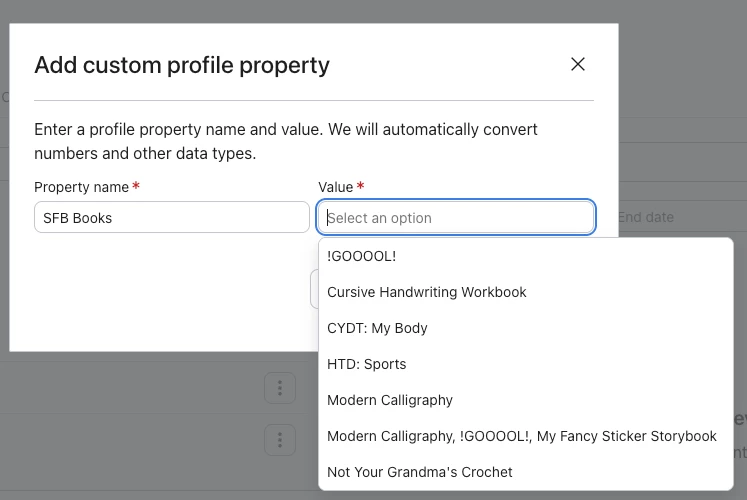
I would like to be able to select the multiple books (Values) to a customer’s profile. In the screenshot below, you’ll see I can only have one Value present under the property name “SFB Books”. It will not let me add multiple value options.
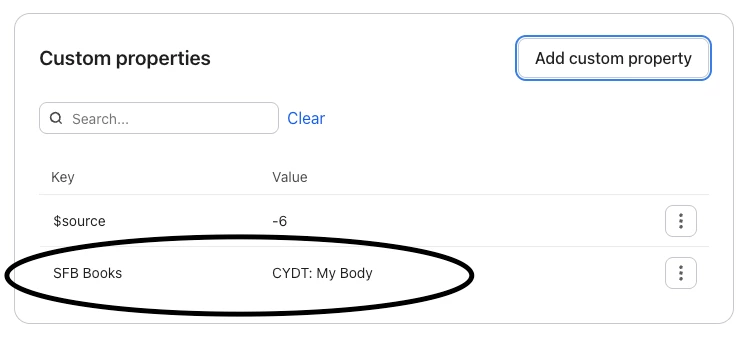
Is there a work around for this?
Background info: the data is not coming from a Klaviyo form, but a Google form and I am manually inputing and tagging customers, with the goal to be able to segment them to send SMS flows for each book title (Value).
Side note: If there’s a way to make a Klaviyo form that is a stand alone landing page that can be shared via URL and not a pop-up, please let me know.