Contributor I
December 16, 2024
Solved

internal alert personalisation

  • December 16, 2024
  • 3 replies
  • 204 views

Hey, 


I want to create a subscription alert that displays the name and surname of the person that signs up to the newsletter. This doesn’t seem to work. What am I doing wrong?
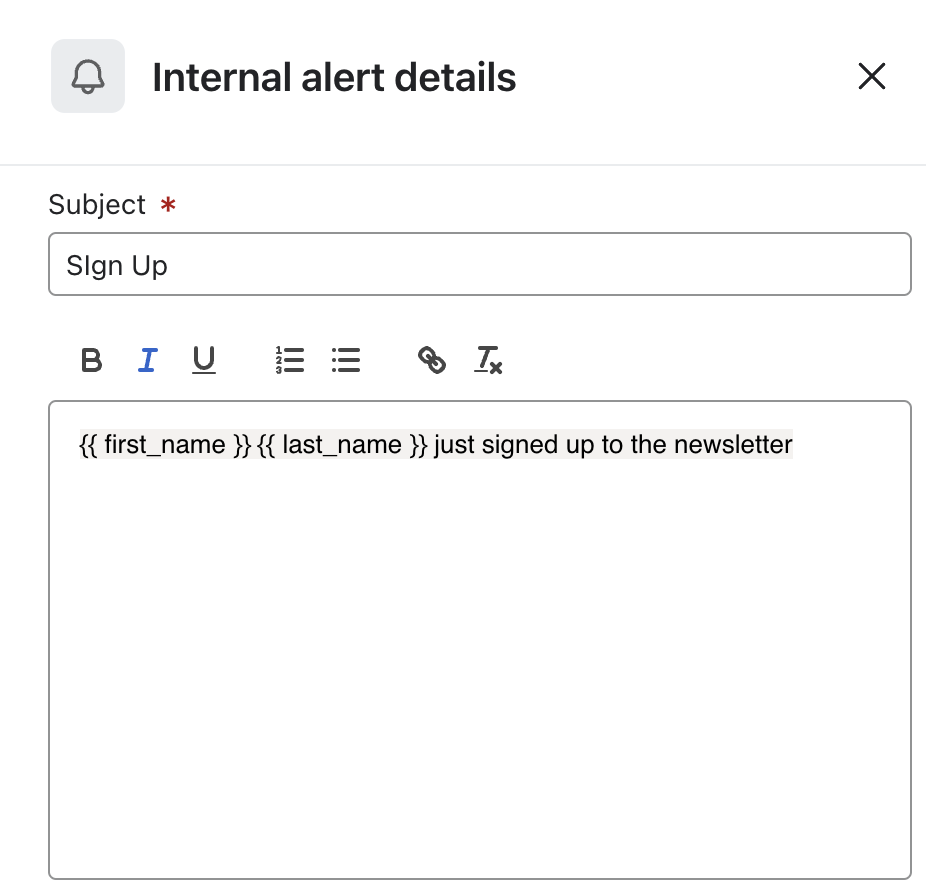


    This topic has been closed for replies.
    Best answer by talhahussain

    To create a subscription alert in Klaviyo that displays the first and last name of a new newsletter subscriber, follow these steps:

    1. Add an Internal Alert Action to Your Flow:

      • In your Klaviyo account, navigate to the desired flow where you want to set up the alert.
      • Drag the Internal Alert action from the sidebar and drop it at the appropriate point in your flow.
      • Specify the recipients (up to 5 email addresses) who should receive this alert.
    2. Customize the Alert Message:

      • In the message content, use Klaviyo's template tags to dynamically insert subscriber information.
      • For the first name, use {{ first_name }}.
      • For the last name, use {{ last_name }}.
      • Ensure that these properties are correctly captured in your subscriber profiles.
    3. Verify Subscriber Profile Properties:

      • Check that the first_name and last_name properties are being collected and stored in your subscribers' profiles when they sign up.
      • If these properties are missing or incorrectly labeled, the personalization tags will not populate as expected.
    4. Test the Alert:

      • Before setting the flow live, test it to ensure that the internal alert emails display the subscriber's first and last names correctly.
      • Use test profiles with the first_name and last_name properties filled to observe if the alert functions as intended.

    3 replies

    stephen.trumble
    Klaviyo Alum
    December 23, 2024

    Hey ​@blckdrgnprss 

    Can you provide more details? Which flow is this a part of and where in the flow is this alert setup? How have you tested this?

    -Stephen
    MANSIR2094
    Expert Problem Solver IV
    Expert Problem Solver IV
    December 23, 2024

    Are your form fields for name and surname correctly set up and mapped to your email platform?

    Mansir Digital Portfolio
    talhahussain
    Expert Problem Solver I
    Expert Problem Solver I
    December 24, 2024

    To create a subscription alert in Klaviyo that displays the first and last name of a new newsletter subscriber, follow these steps:

    1. Add an Internal Alert Action to Your Flow:

      • In your Klaviyo account, navigate to the desired flow where you want to set up the alert.
      • Drag the Internal Alert action from the sidebar and drop it at the appropriate point in your flow.
      • Specify the recipients (up to 5 email addresses) who should receive this alert.
    2. Customize the Alert Message:

      • In the message content, use Klaviyo's template tags to dynamically insert subscriber information.
      • For the first name, use {{ first_name }}.
      • For the last name, use {{ last_name }}.
      • Ensure that these properties are correctly captured in your subscriber profiles.
    3. Verify Subscriber Profile Properties:

      • Check that the first_name and last_name properties are being collected and stored in your subscribers' profiles when they sign up.
      • If these properties are missing or incorrectly labeled, the personalization tags will not populate as expected.
    4. Test the Alert:

      • Before setting the flow live, test it to ensure that the internal alert emails display the subscriber's first and last names correctly.
      • Use test profiles with the first_name and last_name properties filled to observe if the alert functions as intended.
    Talha Hussain - Email Marketing Specialist - talhahussain1100@gmail.com