
Contributor I
Dec 16, 2024 10:40 PM UTC
Solved

internal alert personalisation

Hey, 


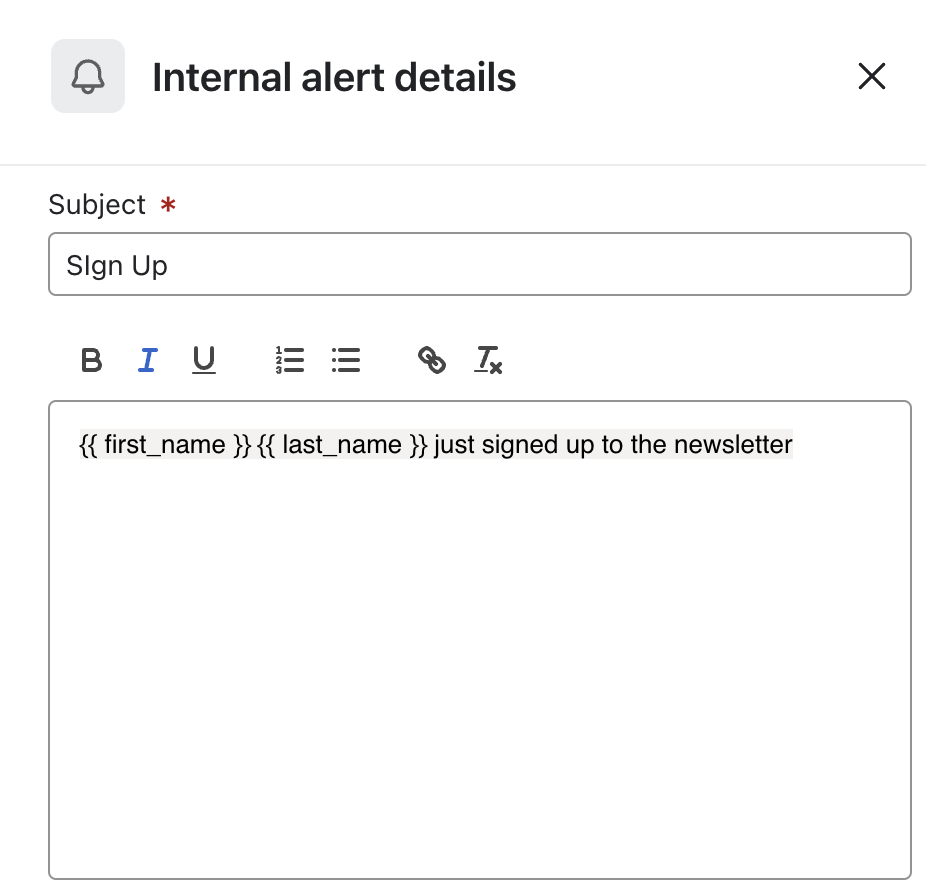
I want to create a subscription alert that displays the name and surname of the person that signs up to the newsletter. This doesn’t seem to work. What am I doing wrong?


    This topic has been closed for replies.
    talhahussain
    Expert Problem Solver I
    Dec 24, 2024 5:24 AM UTC

    To create a subscription alert in Klaviyo that displays the first and last name of a new newsletter subscriber, follow these steps:

    1. Add an Internal Alert Action to Your Flow:

      • In your Klaviyo account, navigate to the desired flow where you want to set up the alert.
      • Drag the Internal Alert action from the sidebar and drop it at the appropriate point in your flow.
      • Specify the recipients (up to 5 email addresses) who should receive this alert.
    2. Customize the Alert Message:

      • In the message content, use Klaviyo's template tags to dynamically insert subscriber information.
      • For the first name, use {{ first_name }}.
      • For the last name, use {{ last_name }}.
      • Ensure that these properties are correctly captured in your subscriber profiles.
    3. Verify Subscriber Profile Properties:

      • Check that the first_name and last_name properties are being collected and stored in your subscribers' profiles when they sign up.
      • If these properties are missing or incorrectly labeled, the personalization tags will not populate as expected.
    4. Test the Alert:

      • Before setting the flow live, test it to ensure that the internal alert emails display the subscriber's first and last names correctly.
      • Use test profiles with the first_name and last_name properties filled to observe if the alert functions as intended.
    Talha Hussain - Email Marketing Specialist - talhahussain1100@gmail.com

    3 replies

    stephen.trumble
    Klaviyo Alum
    Dec 23, 2024 12:10 PM UTC

    Hey ​@blckdrgnprss 

    Can you provide more details? Which flow is this a part of and where in the flow is this alert setup? How have you tested this?

    -Stephen
    MANSIR2094
    Expert Problem Solver IV
    Expert Problem Solver IV
    Dec 23, 2024 5:16 PM UTC

    Are your form fields for name and surname correctly set up and mapped to your email platform?

    Mansir Digital Portfolio
    talhahussain
    Expert Problem Solver I
    Expert Problem Solver I
    Dec 24, 2024 5:24 AM UTC

    To create a subscription alert in Klaviyo that displays the first and last name of a new newsletter subscriber, follow these steps:

    1. Add an Internal Alert Action to Your Flow:

      • In your Klaviyo account, navigate to the desired flow where you want to set up the alert.
      • Drag the Internal Alert action from the sidebar and drop it at the appropriate point in your flow.
      • Specify the recipients (up to 5 email addresses) who should receive this alert.
    2. Customize the Alert Message:

      • In the message content, use Klaviyo's template tags to dynamically insert subscriber information.
      • For the first name, use {{ first_name }}.
      • For the last name, use {{ last_name }}.
      • Ensure that these properties are correctly captured in your subscriber profiles.
    3. Verify Subscriber Profile Properties:

      • Check that the first_name and last_name properties are being collected and stored in your subscribers' profiles when they sign up.
      • If these properties are missing or incorrectly labeled, the personalization tags will not populate as expected.
    4. Test the Alert:

      • Before setting the flow live, test it to ensure that the internal alert emails display the subscriber's first and last names correctly.
      • Use test profiles with the first_name and last_name properties filled to observe if the alert functions as intended.
    Talha Hussain - Email Marketing Specialist - talhahussain1100@gmail.com