Question

Outlook Desktop (Windows) shrinking product images in Dynamic Product Block – how to force image size?

  • January 22, 2026
  • 2 replies
  • 23 views

Forum|alt.badge.img

Hi everyone,

I’m running into an Outlook (Windows desktop, classic) rendering issue with Klaviyo’s Dynamic Product Block and wanted to check if there’s an officially supported solution.

  • Product images uploaded at 1000 × 1000

  • In Gmail, images render correctly (around 288 × 288, fitting the container)

  • In Outlook desktop , the same images render at around 178 × 178, creating excessive white space and breaking the layout

  • I’m using Klaviyo’s built-in Dynamic Product Block, not custom HTML

Is there any supported way to:

  • Force a larger image size in Outlook desktop same as gmail when using Klaviyo’s Dynamic Product Block?


OUTLOOK 
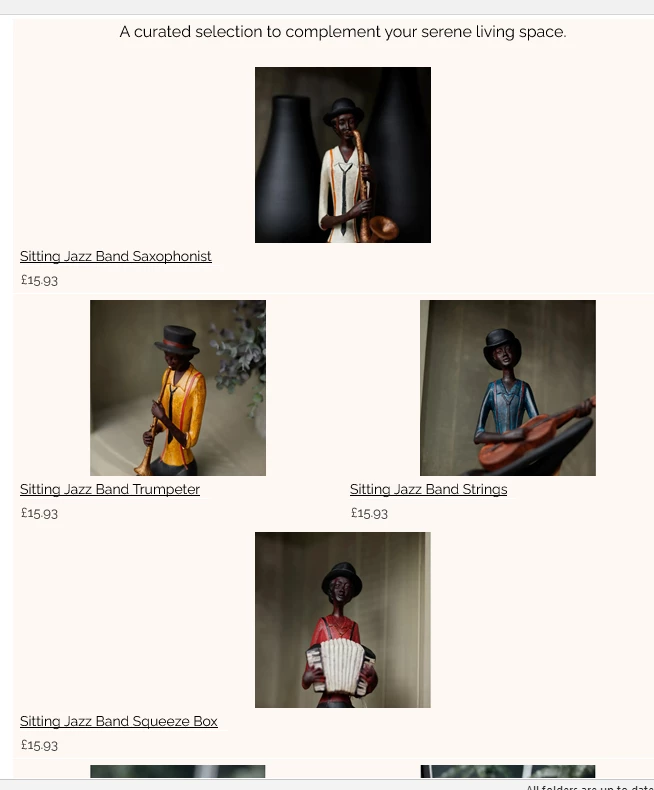
GMAIL



2 replies

Byrne C
Community Manager
Forum|alt.badge.img+28
  • Community Manager
  • January 23, 2026

Hey ​@faizan,

There isn’t an “official” fix to the issues you’re seeing in Outlook, as it relates to how Outlook renders HTML, rather than how the Klaviyo template editor creates the email. That being said, I do have a couple options you can try, that may fix the issue:

  • Take a look at the max width of each cell. Do any of the cells have a way-too-big max width? Might not be the issue, but something to check on.
  • Go to the styles tab of your table, and check on the columns. Are the columns auto width or manual width? Sometimes, Outlook doesn’t process automatic width/sizing well, and it does better with manual widths. I recommend setting a manual width columns and seeing if that works.

Let me know if these work! If not, hopefully other community members can weigh in. Getting emails to look normal in Outlook can be a trial and error process and it would be interesting to know what others have tried.


m1ch43lh3rr
Problem Solver I
Forum|alt.badge.img+5
  • Problem Solver I
  • January 23, 2026

Hi ​@faizan ,

Unfortunately, there’s no supported way to force larger image rendering in Outlook desktop when using Klaviyo’s built-in Dynamic Product Block.

What’s happening here is a known Outlook (Windows desktop, classic) limitation:

  • Outlook desktop uses the Microsoft Word rendering engine

  • It ignores most modern CSS (max-width, responsive scaling, etc.)

  • Klaviyo’s Dynamic Product Block is table-based, and Outlook hard-constrains image sizes inside those tables

  • As a result, product images commonly render around ~170–180px wide in Outlook, even when the source images are much larger (e.g., 1000 × 1000)

This explains why:

  • Gmail renders images correctly (~288 × 288 within the container)

  • Outlook desktop renders them smaller and introduces excess white space

Increasing the source image dimensions does not change this behavior, and Klaviyo does not currently expose any Outlook-specific controls (or VML overrides) for Dynamic Product Blocks.

Workarounds:

  • Design with Outlook as the lowest common denominator (reduce padding/margins to minimize visible white space), or

  • Use custom HTML for product grids if exact image sizing in Outlook is critical (this allows VML-based handling but sacrifices drag-and-drop convenience)

If you stick with Klaviyo’s Dynamic Product Block, this behavior is expected and unavoidable in Outlook desktop.

Hope that helps clarify.