Answer

testing a campaign email

  • July 15, 2021
  • 2 replies
  • 299 views

Forum|alt.badge.img+2

HI there,

I have designed an email campaign and set up lists for the campaign email to go to. But I want to send a test email to myself first.

How do I do that?

I cannot seem to populate the field to just enter my own email address…


Can anyone help please?

Thanks

Sue
Best answer by Mailbox Manny

Hi!

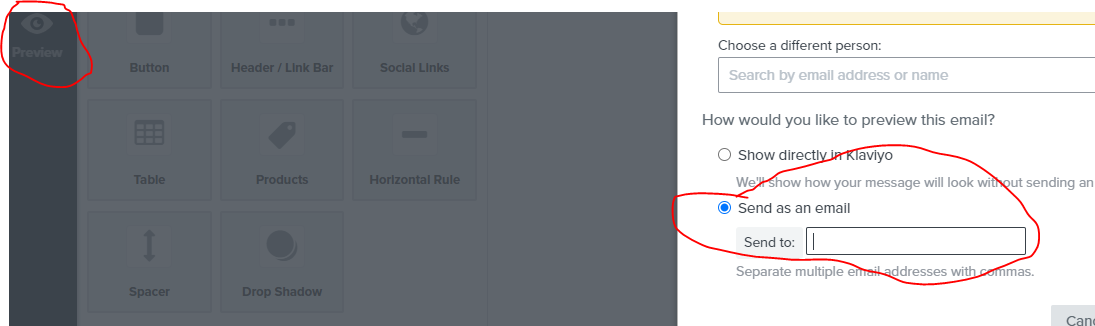
When you go to edit your email in the campaign, you’ll see a “Preview” icon on the left.  Click that and then you’ll see an option to send a test email to an address of your choosing:


2 replies

Mailbox Manny
Partner - Silver
Forum|alt.badge.img+38
  • Partner - Silver
  • Answer
  • July 15, 2021

Hi!

When you go to edit your email in the campaign, you’ll see a “Preview” icon on the left.  Click that and then you’ll see an option to send a test email to an address of your choosing:


David To
Klaviyo Employee
Forum|alt.badge.img+60
  • Klaviyo Employee
  • July 15, 2021

Hello @Sales@AHB,

In addition to the option highlighted by @Mailbox Manny, you can also create a list, add your own email to the list, and use this list as your recipient group for your campaign send. This would allow you to send the email as a Live version to your inbox. After sending, you can then clone this campaign and make any edits and adjustments you need before sending it out to your desired recipients. 

Both the option highlighted by Manny and myself can be found in the How to Preview and Send Test Emails in Klaviyo Help Center Article. 

I hope this helps!

David