Solved

how do I change the lists a subscription form sends to?

  • December 6, 2025
  • 1 reply
  • 16 views

Forum|alt.badge.img+1

I have an existing form and want to send to a new email and SMS list but I can’t find where to do that. The ai bot’s answer was wrong. Did Klaviyo remove the ability to do that? I don’t want to start over, but if I have to, is there a way to turn my form into a template so I don’t have to start completely from scratch? 

On another note, I think this form here is broken. There are no subjects where it says “choose your subject.” Those are sub forum names it looks like. I had to choose something, but it’s wrong.

On still another note, someone needs to train the bot better. It was great a year ago. Really sad to see it go so far downhill. I see this in other apps as well. 

Best answer by cadence

Hey ​@Katandmouse, I’m sorry you had a frustrating experience with Klaviyo’s AI support. Klaviyo definitely still has the ability to control which list a profile gets added to when signing up through a form! 

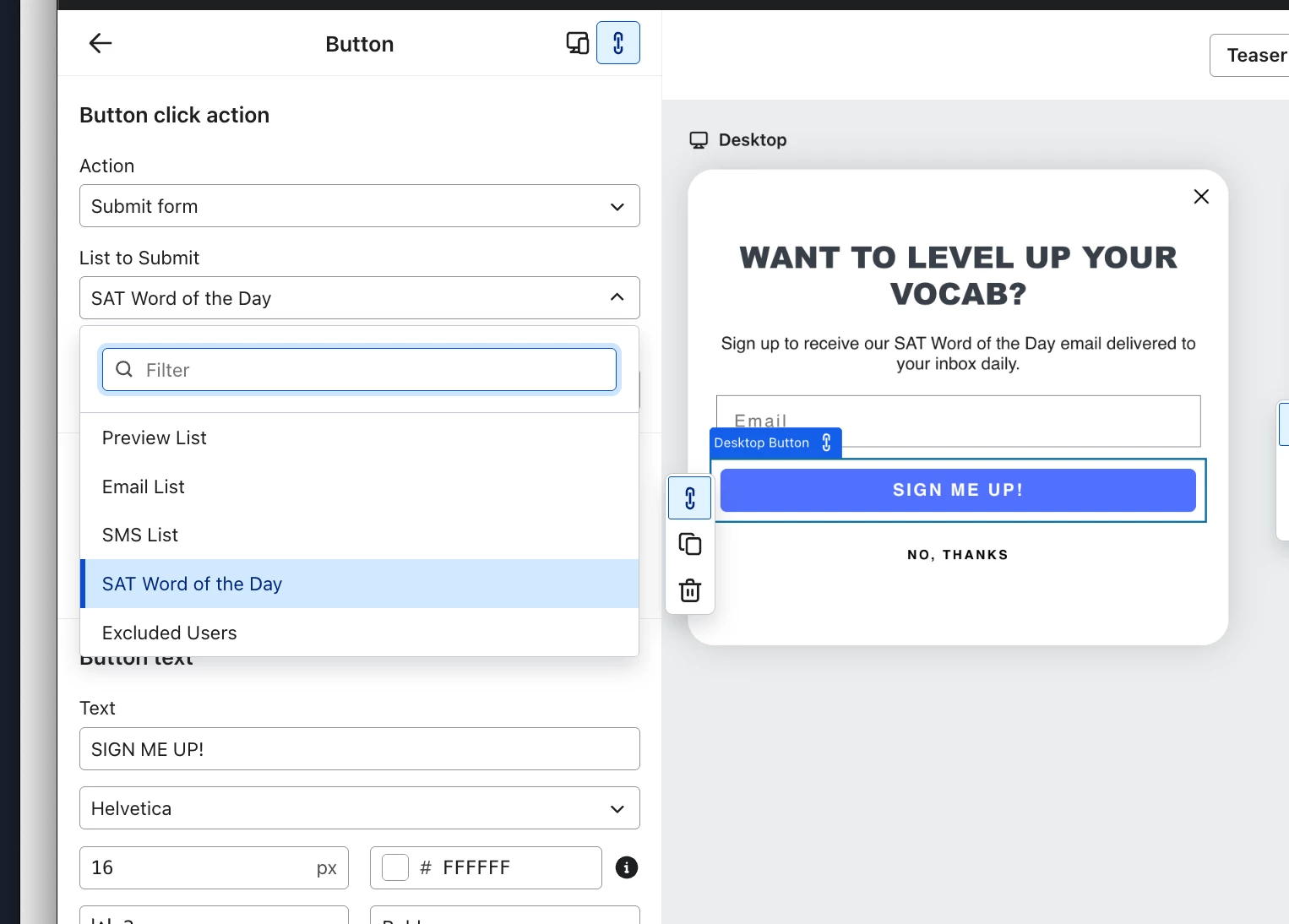
In order to change the list a signup form submits to, you need to select the button that has the “Submit form” action and update the list under “List to Submit”.  Make sure to hit “Publish changes” when you’re done for this to take effect.

Here’s an example: 


If you have a tap to text form where a user subscribes to SMS by messaging a particular keyword, you’d go to Settings > SMS > Subscribe Keywords and update which list a keyword is associated with.

Hope this helps! 

Cadence / Book a demo

1 reply

cadence
Expert Problem Solver II
Forum|alt.badge.img+9
  • Expert Problem Solver II
  • Answer
  • December 8, 2025

Hey ​@Katandmouse, I’m sorry you had a frustrating experience with Klaviyo’s AI support. Klaviyo definitely still has the ability to control which list a profile gets added to when signing up through a form! 

In order to change the list a signup form submits to, you need to select the button that has the “Submit form” action and update the list under “List to Submit”.  Make sure to hit “Publish changes” when you’re done for this to take effect.

Here’s an example: 


If you have a tap to text form where a user subscribes to SMS by messaging a particular keyword, you’d go to Settings > SMS > Subscribe Keywords and update which list a keyword is associated with.

Hope this helps! 

Cadence / Book a demo