Question

Sender Information Free Account

  • July 6, 2026
  • 2 replies
  • 25 views

Forum|alt.badge.img

Hi guys, 

I'm trying to send myself a test email from my account, but it's not arriving in my inbox or spam folder.

I think the issue may be that I can't set up or verify a sender email address. When I go to Settings > Email > Sender information, the page only shows the Klaviyo footer and no option to add a sender address.

I've already tried:

  • Refreshing the page
  • Using a different browser

I'm on the free plan, and I want to be able to set up a sender email so I can send test emails and preview my email before sending campaigns.

Can you help me figure out why the sender information page isn't showing the proper options?

Thank you.

2 replies

bluesnapper
Partner
Forum|alt.badge.img+46
  • Champion & Partner
  • July 7, 2026

Welcome to the community ​@hannahlogan8 

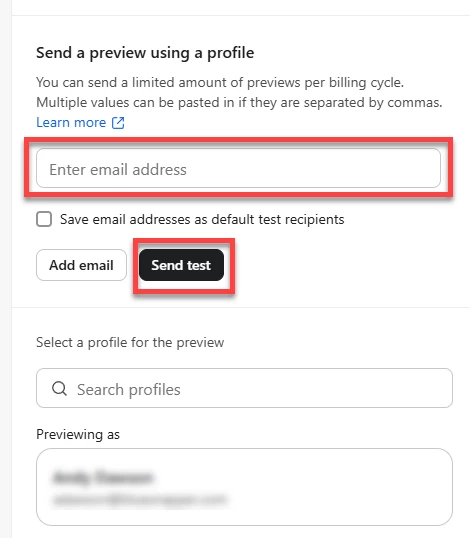
To send a preview of any campaign or flow email to a test address, just edit the email and select the preview button in the top right corner.

In the preview screen, add your test email address (see below) and then send test. You can also search for a profile (‘Previewing as’ field) if you want to see the email a specific profile will receve.

This above works on a free plan.

If you are still not receiving your test emails (including into spam), it maybe that they’re being blocked earlier in the chain - have you verified your sending domain to flag to email systems that Klaviyo is approved for sending on behalf of your domain?  That set-up is here https://www.klaviyo.com/settings/account/domains and more info here: https://help.klaviyo.com/hc/en-us/articles/115000357752

I hope that helps but if I’ve misunderstood your issue, please let me know.

Regards

Andy


Forum|alt.badge.img

Hi ​@hannahlogan8,

On a free Klaviyo account, you should still be able to preview and send test emails without needing to send a live campaign.

To send a test email, open the campaign, flow email, or template you want to test, then click Preview & test in the email editor. From there, enter your test email address and click Send Test. You can also use the preview option to view how the email will appear for a specific profile.

If the test email is still not arriving in your inbox or spam folder, the issue may not be related to the free plan. It could be a deliverability or domain authentication issue. I recommend checking whether your sending domain has been properly verified in Klaviyo. You can review this under your account’s domain/sending domain settings and complete the required DNS setup if needed.

Also, if the Settings > Email > Sender information page is only showing the footer and no options, this may be a page-loading or account-specific issue. Since you have already tried refreshing and using another browser, the next steps would be:

  1. Try clearing browser cache and cookies.
  2. Try opening Klaviyo in an incognito/private window.
  3. Confirm you have the correct account permissions.
  4. Check whether your sending domain is verified.
  5. If the page still does not load correctly, contact Klaviyo Support with a screenshot of the issue.

In short, test emails should be available from the Preview & test option, but if they are not being delivered, verifying your sending domain and checking account/page access would be the best next steps.